
3 min. read
Passbolt Clears Three Security and Compliance Audits
This blog breaks down key findings from three independent assessments, reinforcing our commitment to strong security and compliance.

With the imminent release of passbolt v5 in mid-April, we are making some important changes to our minimum PHP requirements. This post explains what is changing, why it matters, and how to prepare your systems.
Passbolt v5 will require PHP 8.2 or higher. This is a significant change from our current minimum requirement of PHP 7.4.
We're committed to continuously keeping passbolt secure, reliable, and up-to-date with modern product development practices. Accordingly, here is why this change is necessary:
If you're running passbolt on a system with PHP 8.2 or higher, you will be ready for the v5 update when it arrives. If you're on an older PHP version, you'll need to upgrade before migrating to passbolt v5.
Here is a quick reference of common distributions and their default PHP versions, plus the respective migration strategy which we recommend:
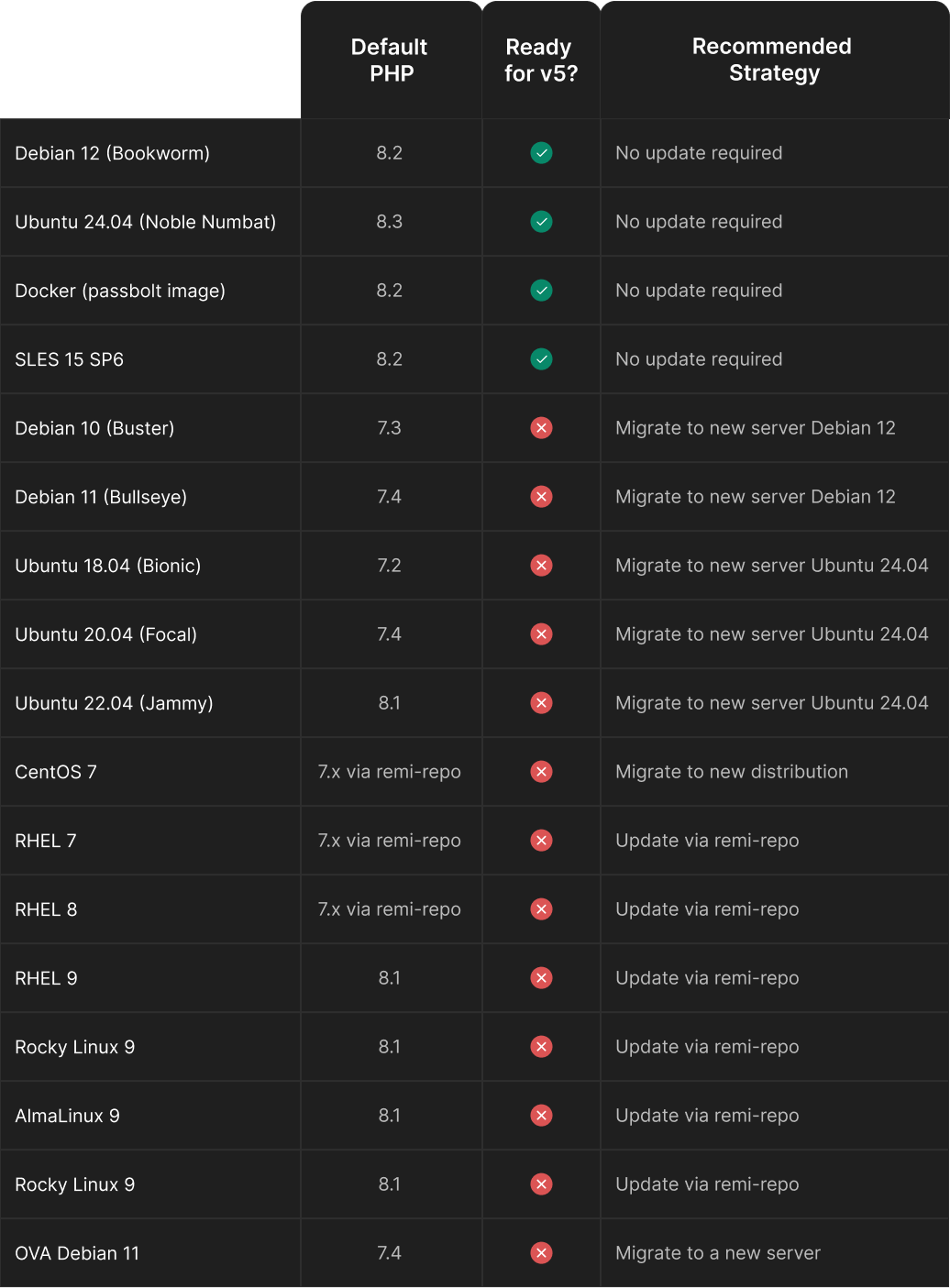
Based on your current setup, you have the following options to move forward:
The recommended approach for most environments is to migrate to a new server running a distribution that supports PHP 8.2 by default. This provides the cleanest upgrade path and minimizes potential issues.
For detailed migration instructions, we've prepared comprehensive guides on our help site: Server Migration Documentation.
If you are unable to upgrade immediately, you can continue using passbolt v4 while planning your migration. Client compatibility with v4 will be maintained until v6, giving administrators ample time to migrate at their own pace. This means that future versions of the browser extensions, mobile and desktop apps, and the CLI will remain compatible with passbolt v4 until the release of v6.
For experienced administrators, you can choose to keep your current installation and proceed as follows:
We now provide a step-by-step guide on how to use Remi's RPM repository for RHEL/CentOS and Ondřej Surý's PPA for Ubuntu/Debian to upgrade PHP 8.2 on your existing stack.
For RHEL 9 and Redhat like distros users who prefer to update PHP rather than migrate to a new server, here's how to install PHP 8.2 using Remi's repository. If you installed passbolt using our one-liner script, you already are using Remi’s repository. Please before doing anything, make a backup of your instance.
Reset PHP modules and enable PHP 8.2 from Remi:
dnf module reset php -y
dnf module disable php -y
dnf module enable php:remi-8.2 -y
Install or update PHP 8.2 and the extensions needed for passbolt:
dnf install -y php php-cli php-curl php-fpm php-gd php-intl php-json php-mbstring php-mysqlnd php-pecl-gnupg php-pgsql php-process php-xml php-ldapVerify that PHP 8.2 is now installed:
php -vYou should see output indicating PHP 8.2.x is installed.
Configure PHP-FPM to start automatically and start the service:
systemctl enable php-fpm
systemctl start php-fpm
Restart your web server:
systemctl restart nginxOnce PHP 8.2 is properly installed and configured, you'll be ready for the passbolt v5 update when it becomes available in April. Remember to back up your database and passbolt configuration before performing any major version upgrade.
For Debian 11 and Ubuntu 22.04 users who prefer to update PHP rather than migrate to a new server, here's how to install PHP 8.2 using Ondřej Surý's repository:
First, make sure you have a backup of your system prior to the update and let's make now sure your system is up to date:
sudo apt update
sudo apt upgrade
Add the GPG key for the Ondřej’s repository:
curl -fsSL https://packages.sury.org/php/apt.gpg | sudo gpg --dearmor -o /usr/share/keyrings/php-archive-keyring.gpgAdd the repository to your sources list:
echo "deb [signed-by=/usr/share/keyrings/php-archive-keyring.gpg] https://packages.sury.org/php/ $(lsb_release -sc) main" | sudo tee /etc/apt/sources.list.d/php.listUpdate package lists with the new repository included:
sudo apt updateInstall PHP 8.2 and the extensions needed for passbolt:
sudo apt install -y php8.2 php8.2-cli php8.2-common php8.2-curl php8.2-fpm php8.2-gd php8.2-intl php8.2-mbstring php8.2-mysql php8.2-opcache php8.2-xml php8.2-gnupg php8.2-pgsql php8.2-ldapVerify that PHP 8.2 is now installed:
php8.2 -vConfigure the system to use PHP 8.2 as the default PHP version:
sudo update-alternatives --set php /usr/bin/php8.2Verify that PHP 8.2 is now the default version:
php -vConfigure PHP-FPM to start automatically and restart the service:
sudo systemctl enable php8.2-fpm
sudo systemctl start php8.2-fpm
If you're using Nginx, update your configuration to use PHP 8.2-FPM:
# Edit your passbolt nginx configuration
sudo nano /etc/nginx/sites-enabled/nginx-passbolt.conf
# Change the PHP-FPM socket path if necessary
# From: fastcgi_pass unix:/run/php/php7.4-fpm.sock;
# To: fastcgi_pass unix:/run/php/php8.2-fpm.sock;
Test your Nginx configuration:
sudo nginx -tIf the test is successful, restart Nginx:
sudo systemctl restart nginxVoilà!
Passbolt v5 marks a significant step forward, with PHP >= 8.2 enabling us to build on a more modern, secure foundation. In the coming weeks, we will be sharing more details about the exciting new features in v5.
By upgrading now, you will be ready to take full advantage of the v5 improvements as soon as they're available. Let's continue building together the most secure platform for teams to collaborate on passwords, secrets and other sensitive data.
3 min. read
This blog breaks down key findings from three independent assessments, reinforcing our commitment to strong security and compliance.

6 min. read
In this TechRadar Pro opinion piece, discover tips for securing sensitive digital credentials.


 Made in Europe. Privacy by default.